
Scatter Links in the Philippines: How to Verify Official Gaming Websites
Check a scatter link against official PAGCOR resources, read the domain correctly, and know what to do when an address or redirect does not match.
Found a scatter link and want to check where it leads? Start with the source. Look up the gaming brand through PAGCOR’s official resources, compare the listed domain with the address you received, and check whether the destination changes after a redirect.
This guide explains those checks step by step. A matching listing helps verify the website’s identity; it does not guarantee withdrawal outcomes or every claim made on the site. You can do the initial comparison without creating an account, uploading identification, or making a payment.
Editorial check: 1 October 2026. We checked the public directory and captured the screenshot below on that date. This is a website-identity guide, not a test of any operator’s account, game, or payment service.
Key Takeaways
- Start from an independently located official source, not a link supplied by the page you are checking.
- Compare the actual domain. A familiar name in a logo, path, or message is not enough.
- When the evidence does not match, record the uncertainty and pause. Do not turn a missing result into either an approval or an accusation.
What Does “Scatter Link” Mean?
In this guide, “scatter link” means a website address someone shares or searches for when looking for a scatter-style slot game. The phrase alone does not identify a particular operator, an approved domain, or one universal gaming website.
Separate three things: the game being discussed, the brand offering access, and the address of the website. A message can mention a familiar game while directing you to a different company or an unrelated domain. Start by asking which brand the sender claims to represent, then check that claim separately.
The question here is where a link leads, not how to play. For the broader checks behind a licensing claim, see our guide to checking a PAGCOR licence.
How to Check a Gaming Website Through PAGCOR
Use PAGCOR’s own resources as your reference point. Its announcement of the PAGCOR Guarantee website identifies the official directory and explains its verification purpose. The announcement is dated 18 June 2025; the live directory is a separate, changeable source.
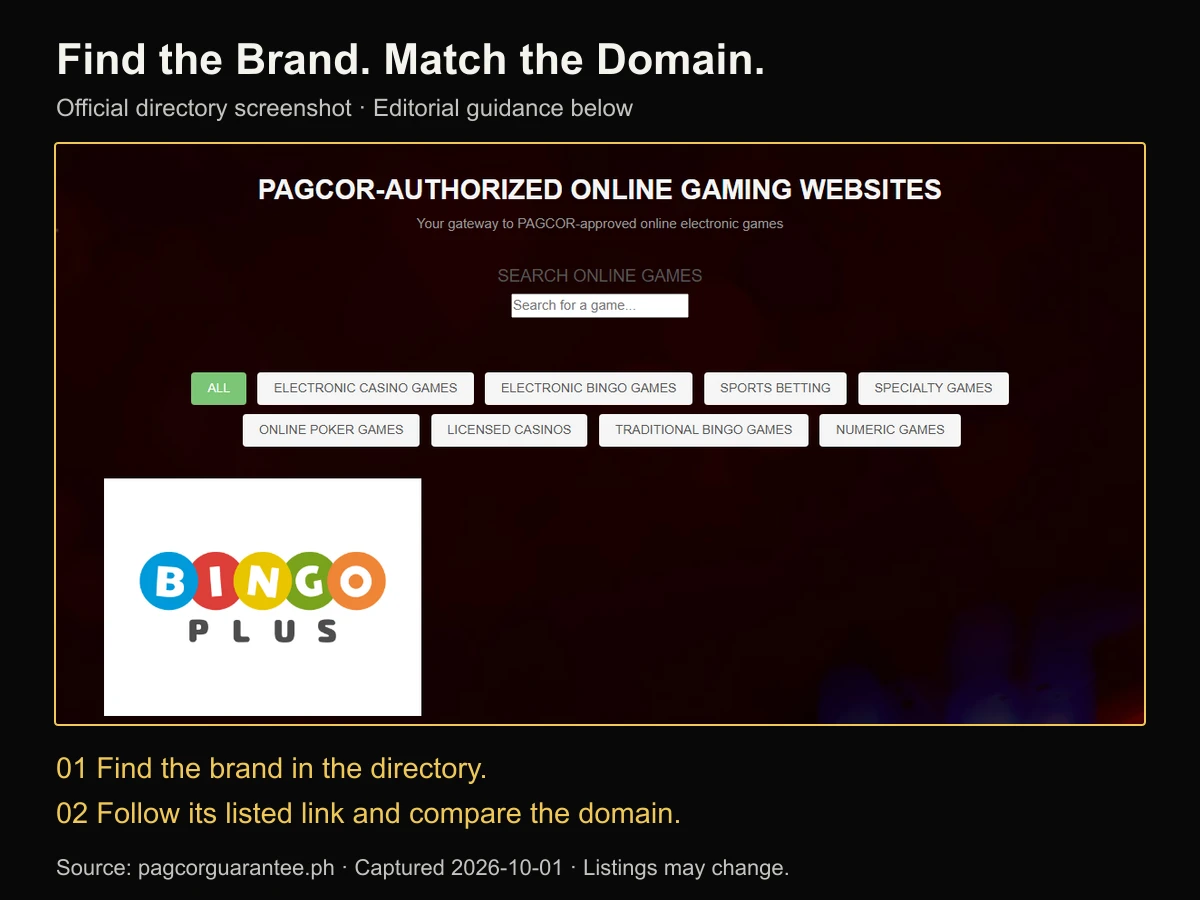
1. Open the official reference independently
Start with the regulator’s announcement above and follow its directory link, or use the PAGCOR Guarantee directory. Check the address of the reference page itself. A screenshot or a “verify licence” button supplied by an unfamiliar website should not be your only evidence.
Keep the reference in one tab and the address you want to check in a separate note. You do not need to interact with the unfamiliar page just to compare its written address.
2. Find the claimed brand
Use the directory’s search field or browse its listings. Look for the specific brand named in the message or website, rather than assuming a game title is also the operator’s name. Keep the category selection in mind if a filter is active.
If the name does not appear, check the spelling and return to the full list. Do not guess a near-matching name. A similar label is a lead to investigate, not a completed match.
3. Compare the linked address
Inspect the directory entry’s destination and compare it with the address you were given. On a desktop browser, the link destination may appear when you hover; on a phone, the link menu may offer a preview or copy option. Browser behaviour varies, so use whichever method exposes the full address without submitting information.
Record the brand, the reference address, the address received, and the date. If they differ, keep both versions. Removing a suffix or changing a spelling to make the addresses look alike would defeat the check.
4. State only what the check established
A useful note says: “The address matches the link displayed for this brand in the directory on this date.” It does not say: “Every service on the site has been tested.” Questions about account verification and payment conditions require separate evidence; our KYC and withdrawal-problem guide covers that different task.
How to Read the Domain Before Opening a Link
Read the address itself, not just the clickable label. The domain, path, and query are different parts of a URL, as explained in MDN’s guide to URL structure.
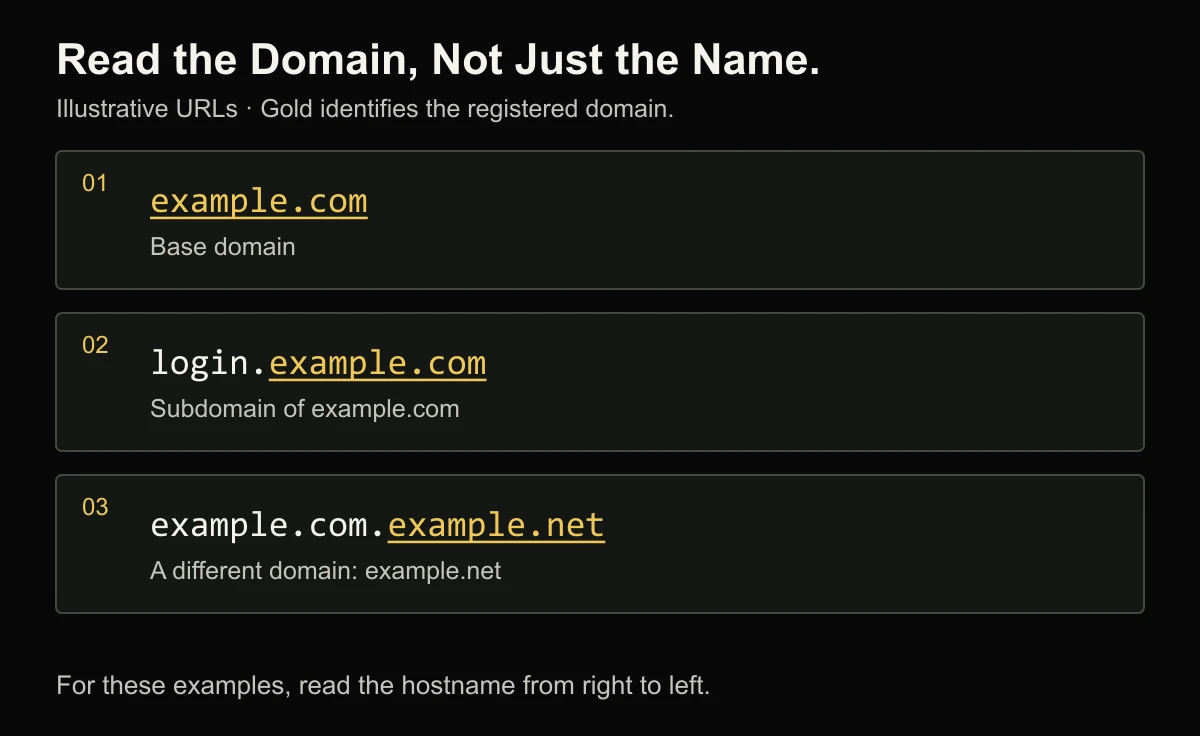
Consider these hypothetical examples:
- example.com is the base domain in the first example.
- login.example.com is a subdomain of example.com.
- example.com.example.net is under example.net, despite containing the text “example.com”.
A brand-looking word after the first path slash does not change the domain either. The example domains are used for explanation, not as links to gaming services; IANA maintains example domains for documentation.
Do not reduce the check to “take the last two words”. Public suffixes differ, including structures such as .com.ph. Comparing the complete address with the independently verified reference is more useful than applying a shortcut to an unfamiliar suffix.
On a narrow phone screen, tap the address bar to inspect the full host. If the address is still shortened or hidden, copy it into a private plain-text note. Do not post full account-specific links publicly: a URL can contain identifiers or tokens beyond its domain.
What Logos, HTTPS, and Search Rankings Can Tell You
Treat these as different signals, not interchangeable proof. A page can look convincing while the particular identity claim remains unverified.
A logo is a claim on the page. Match it against an independent source instead of accepting the artwork as its own evidence. The same applies to a badge or image of a certificate: you still need a current record that identifies the relevant website.
HTTPS concerns the connection. Google explains that a secure connection protects information in transit between you and the site, while still advising users to check the site name before sharing sensitive information. It is not a substitute for checking who operates the destination. See Chrome’s connection-security guidance.
Search position is not the record you are trying to verify. A result, advert, or social post can help you find a name to investigate. For this task, the supporting evidence must be the relevant official record and matching address, not how prominently a link appeared.
Keep the conclusion narrow even when several signals agree. A correct address, a recognisable logo, and an encrypted connection still do not answer every question about terms, eligibility, privacy, or a particular transaction.
What to Do When a Link Does Not Match
Use “needs verification” when the evidence is incomplete. That is a practical stopping point, not a finding that the website is illegal or fraudulent.
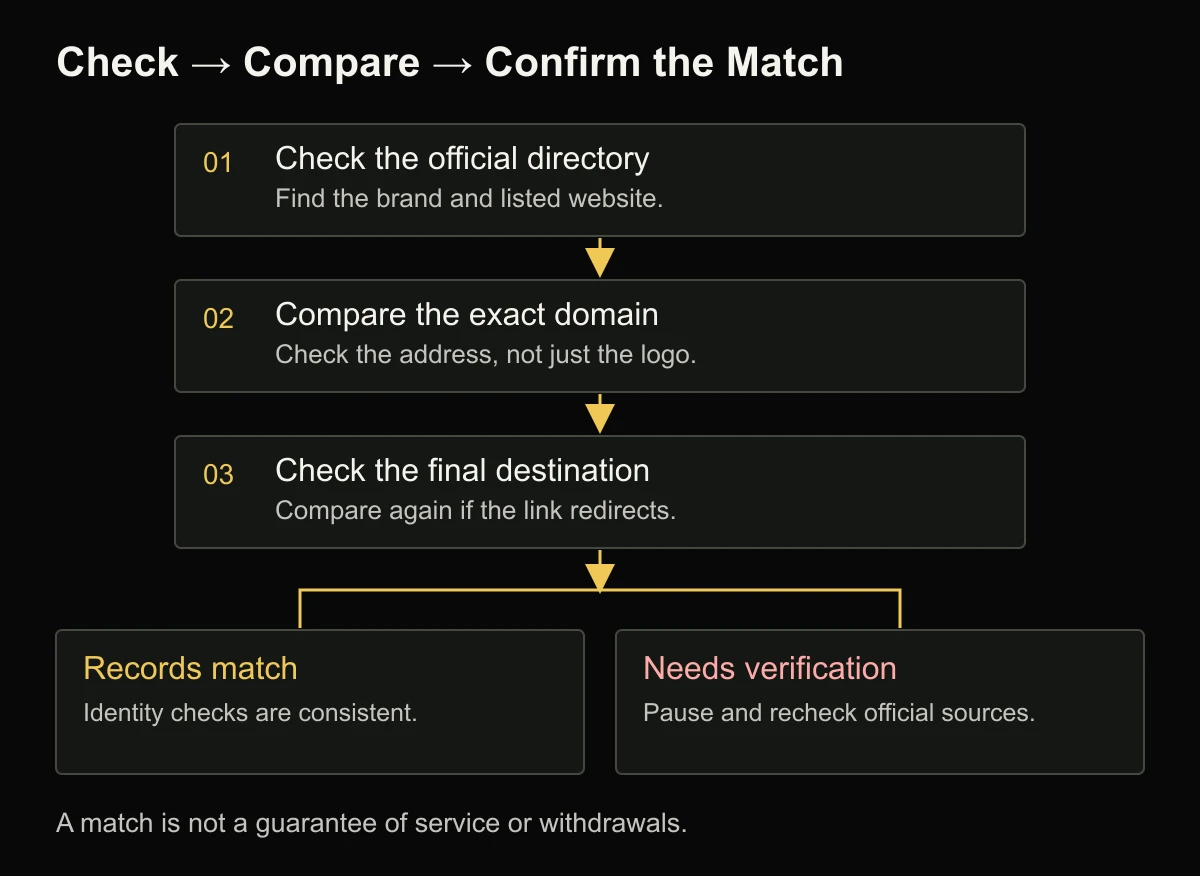
If the brand is absent: preserve the address and check whether you used the correct name and current source. Seek clarification through contact details obtained independently from the regulator or verified operator reference. Do not let the unverified page supply both the claim and the supposed proof.
If the website redirects: compare the final address, not only the original one. A redirect can have an ordinary explanation, but that explanation still needs confirmation when the destination changes. Do not assume that every address reached through a listed site is separately authorised.
If a message announces a “new official link”: locate a corresponding update independently. The message itself is not enough to connect the new domain to the old identity. Until the relationship is established, avoid sending money, identification, or login details through the new destination.
If the browser displays a warning: stop rather than disabling the warning to finish the check. The unresolved item can remain unresolved. Our Safety hub provides related consumer-information guides.
Frequently Asked Questions
Can I rely on an old directory screenshot?
Use it as a dated reference, not evidence of the current listing. Reopen the official resource and compare today’s details. The screenshot in this article documents our check on 1 October 2026; it does not update when the directory changes.
Does a website listing verify an App download too?
This website check does not establish the identity of a separate app package. App names, developer details, permissions, and distribution sources need their own comparison. Do not install an unfamiliar file simply because the message promoting it mentions a listed brand.
What should I keep if I need to ask about a mismatch?
Keep the claimed brand, both domains, the reference-page address, the date, and a screenshot showing the difference. Leave out passwords, verification codes, identification documents, and account tokens. A short, specific question about the mismatch is more useful than forwarding your entire account history.
What if the official reference is temporarily unavailable?
Wait and retry through the regulator’s main website or independently confirmed contact channel. A temporary failure does not validate a replacement link offered elsewhere. Mark the check as incomplete rather than treating an inaccessible source as a match.
Check the Source Before Trusting the Link
For any scatter link, keep three questions separate: Which brand is claimed? Which domain is recorded? Where does this address actually lead? Record what matches and what remains uncertain.
Check PAGCOR’s official directory and compare the current entry before trusting a forwarded address. For our sourcing standards, see the LEGITCASINO editorial policy. For support and limits unrelated to link verification, visit our responsible-gambling information.